mirror of
https://github.com/kartikay-bagla/nasa-potd-customizable-wallpaper.git
synced 2026-11-05 18:31:50 +00:00
Customizable NASA's Picture of the Day Wallpaper for KDE Plasma
- Python 70.7%
- JavaScript 12.1%
- HTML 9.7%
- CSS 7.5%
| .gitignore | ||
| day.html | ||
| index.js | ||
| nasa_potd_desc.py | ||
| README.md | ||
| requirements.txt | ||
| style.css | ||

Customizable NASA's Picture of the Day Wallpaper for KDE Plasma
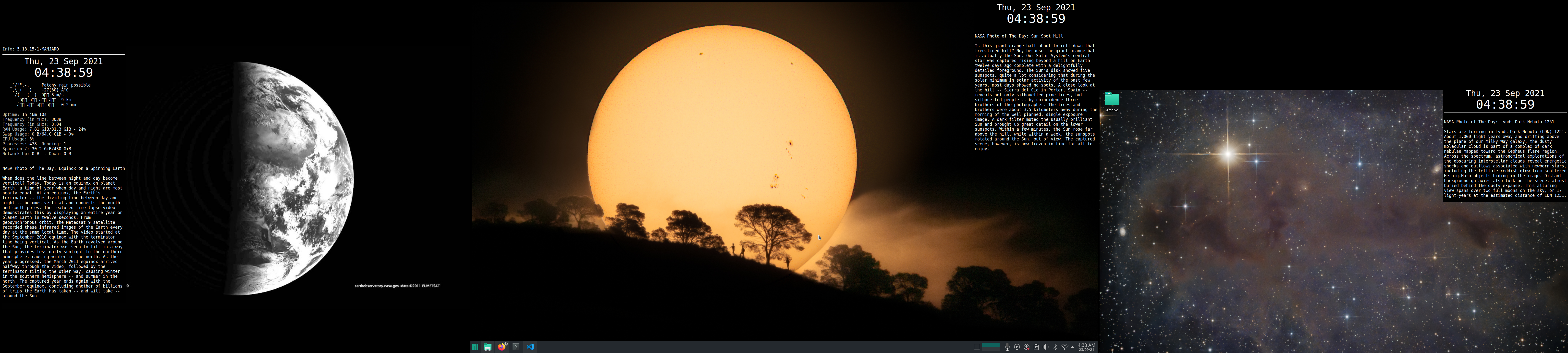
KDE Plasma has an option to set your wallpaper as NASA's Picture of the Day and it's really nice.
But I was facing 2 problems with this:
- Unfortunately you can't really understand the image without the explanation provided on NASA's page.
- Using a triple monitor setup, I wanted 3 different images for the last 3 days (including today) KDE by default did not provide this functionality and I didn't want to spend too much time (yet) into building a plugin for KDE.
So here's my solution to these problems:
- Use conky to display the explanation
- Use a plugin called HTML Wallpaper and create a page that can display NASA's POTD for a particular day offset.
The
nasa_potd_desc.pyfile solves both of these problems. It prints out the output for conky to display on my screen and saves the image to be displayed on a HTML page using HTML Viewer.
How to use
- Clone the repository
- Add the following line to your conky config replacing
[offset]with the number of days you want to offset the results by:${execpi 300 python /home/kartikay/Programming/nasa-wp/nasa_potd_desc.py -d [offset]} - Install the HTML Wallpaper plugin and set the path to replacing
[offset]as before and subsituting your monitor's height and width for[height]and[width]:file:///location/of/repository/day.html?diff=[offset]&height=[height]&width=[width]
Final Results: